

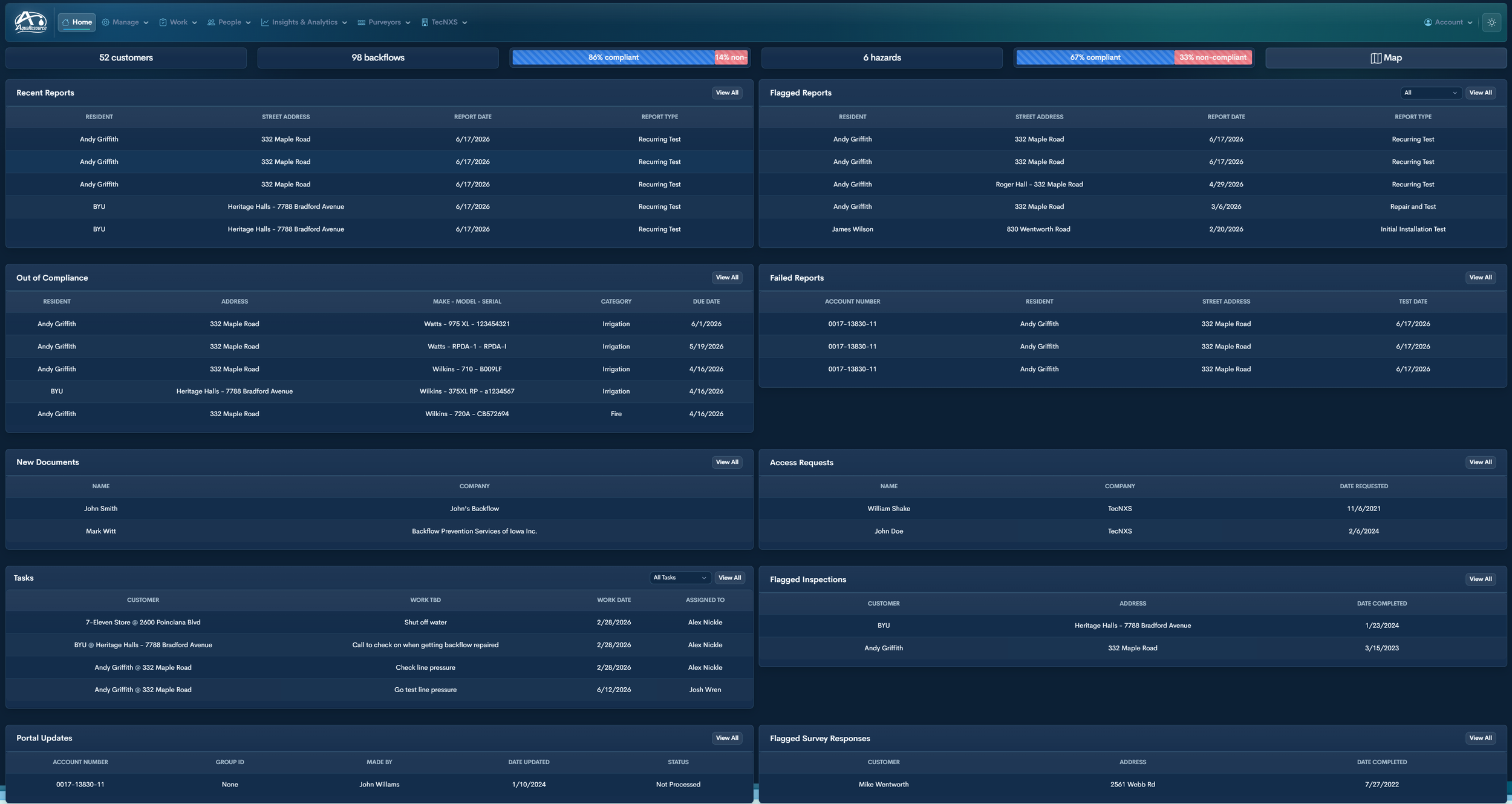
The Administrative Dashboard
A real-time view of what needs attention now.
-
Appears when:
• A tester flags a report for review
• The system detects unusual year-over-year readingsOpen → Review → Take action → Unflag.
-
Devices automatically appear here when the annual test due date has passed. -
Any required documents updated by a tester are automatically routed for administrator approval. -
Operational actions tied to a specific account or device.Assign work to internal staff
Link tasks directly to a backflow assembly
Define scheduled work dates
Track status (not completed / completed)
Document work to be done
Record work completed
Reassign or unassign staff
Maintain a permanent task history
Each task connects enforcement, field work, and compliance documentation in one record.
-
Hazards without required backflow protection.Identify properties requiring device installation
View hazard type and classification
Track due dates for compliance
Prioritize enforcement actions
Ensures hazard conditions are not left unprotected.
-
Customer-submitted surveys requiring review.View flagged responses tied to addresses
See completion date
Identify potential hazard changes
Initiate follow-up actions
Ensures questionnaire responses translate into enforcement when necessary.
The Administrator Dashboard is built around workflow. When an admin logs in, the objective is: identify what requires attention and act immediately. All data updates in real time.
-
A live, chronological feed of incoming test submissions. -
AquaResource automatically determines pass/fail.Next steps are handled according to the utility’s policy.
-
Review and approve or deny new testers into your system. -
External changes submitted through the customer portal.View updates submitted by customers
See account number and group association
Review requested changes (email, phone, notice preference, etc.)
View submission timestamp and submitted-by information
Approve or deny updates before they affect account records
Navigate directly to the customer profile
All external updates require administrative action before becoming active.
-
Inspections requiring review based on the results submitted.Inspections are created from the Customer Profile
Inspection forms can be configured to flag specific answers
When a flagged response is received, the related record appears here for review
Administrators can open the customer record, evaluate the response, and take next action
This ensures survey responses translate into timely follow-up and enforcement when needed.
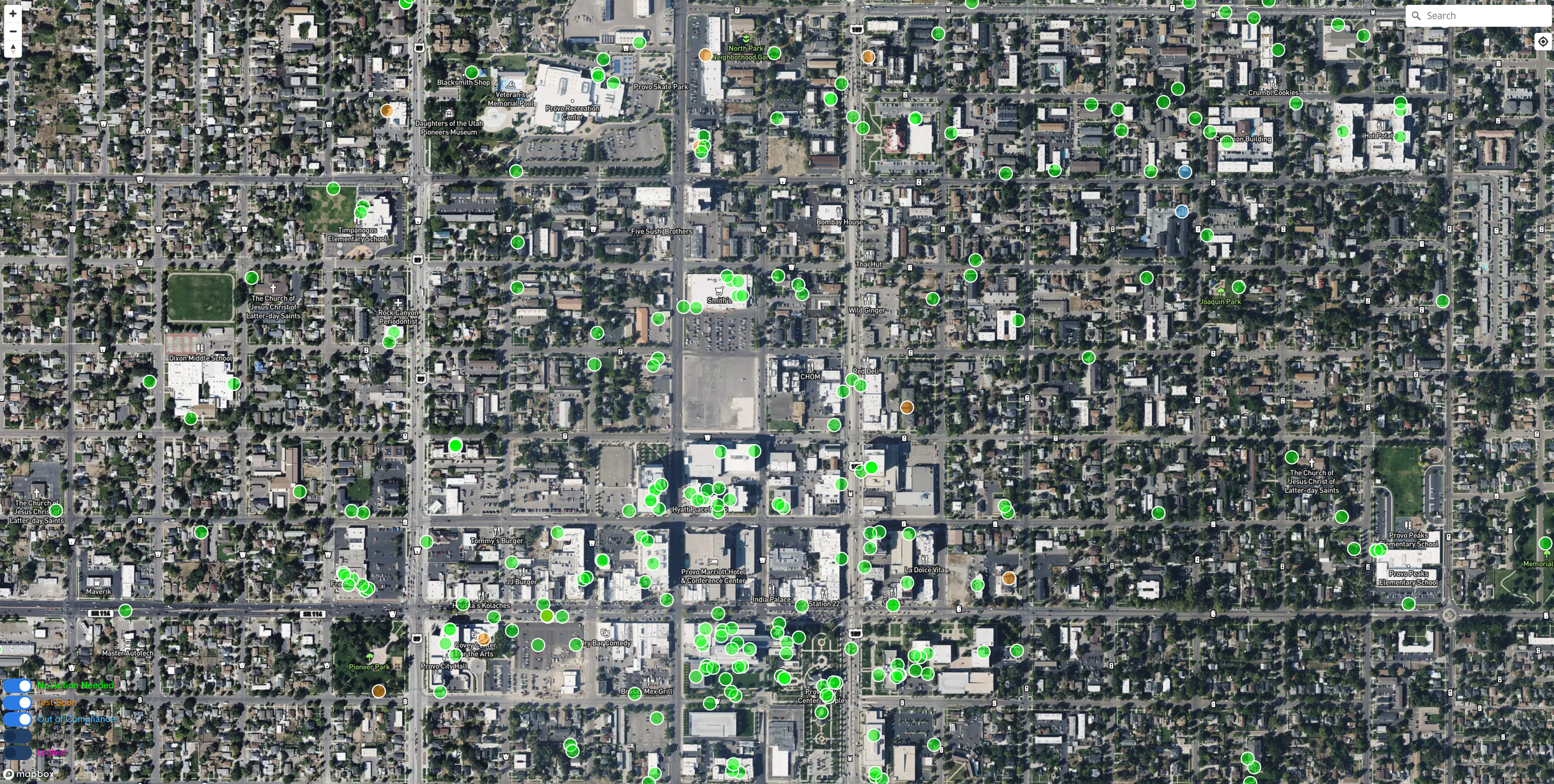
Device Mapping with Compliance Status
View all devices on an interactive map
See compliance status at a glance
Click any pin to open the full device record
Administrators and testers can pin and update device locations
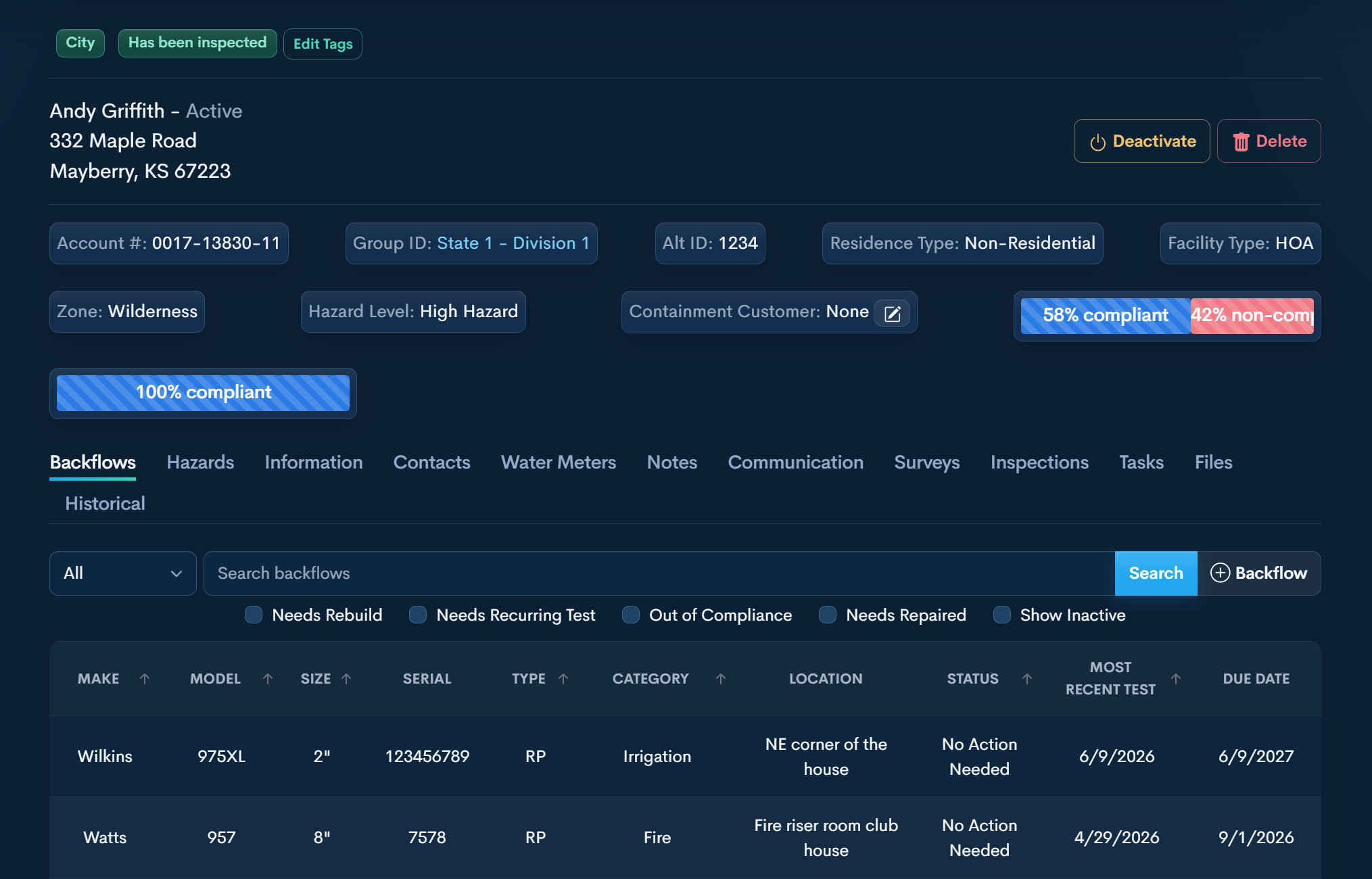
The Customer Profile
A complete operational record for each service address.
The Customer Profile centralizes regulatory classification, devices, communication history, and compliance documentation in one structured location. Every tab is tied to the physical address and updates in real time.
-
All backflow prevention assemblies at the service address.View make, model, size, serial number, type, and category
Track compliance status and due dates
See most recent test at a glance
Filter by rebuild, recurring test, repair, or out of compliance
Open full device record with reports, notes, notices, photos, and history
Each device maintains a complete lifecycle record.
-
Regulatory hazard classification for the property.Define hazard conditions at the location
Require a backflow assembly for protection
Generate installation letters when protection is required
Link assemblies directly to hazards
Document protected vs. unprotected conditions
Hazards control regulatory classification and determine required protection.
-
Core account and site data.Account number and alternate identifiers
Grouping and division structure
Site address and jurisdiction
Facility type and zoning
Hazard level classification
Residential or non-residential designation
Notice delivery preferences
This section controls regulatory classification and visibility rules across the system.
-
Mailing and communication contacts tied to the account.Primary and secondary contacts
Mailing address separate from site location
Email addresses and phone numbers
Use-for-mailing designation
Group-level updates
Contacts do not have to be physically located at the service address.
-
Service meter records tied to the property.Meter number and serial
Tap number
Manufacturer and size
Line size and service size
Installation location
Used for reference and cross-department documentation.
-
Internal documentation tied to the address.Add administrative notes at the account level
Document phone calls, conversations, extensions, and decisions
Record compliance discussions or enforcement steps
Maintain a running operational history
Notes are internal and do not appear on customer-facing portals.
-
Complete notice and letter history.Backflow notices
Hazard notices
Reminder letters
Sent and unsent status
Previewed vs. mailed
Reprint and recreate notices
Date filtering and export
All notice activity remains documented for compliance tracking.
-
Regulatory questionnaires sent to customers.Mail or email delivery
Tied directly to the service address
Customer-completed submissions
Flagged responses for review
Completion tracking
Survey responses appear in the administrative workflow when action is required.
-
On-site inspection records.Schedule inspections
Document findings
Tie inspection results to hazards and devices
Maintain inspection history
Inspection records support regulatory enforcement.
-
Internal operational tracking.Assign tasks to staff
Link tasks to devices or accounts
Track inspections, follow-ups, and pressure checks
Document completion history
Used to manage workload across the program.
-
Address-level documentation storage.Upload supporting documents
Store photos, permits, compliance records
Keep correspondence tied to the property
Anything that should remain permanently tied to the address belongs here.
-
Imported or legacy data.Historical reports
Previous compliance records
Imported documentation
Optional data migration
This section may remain empty. It exists to preserve continuity when prior records are available.
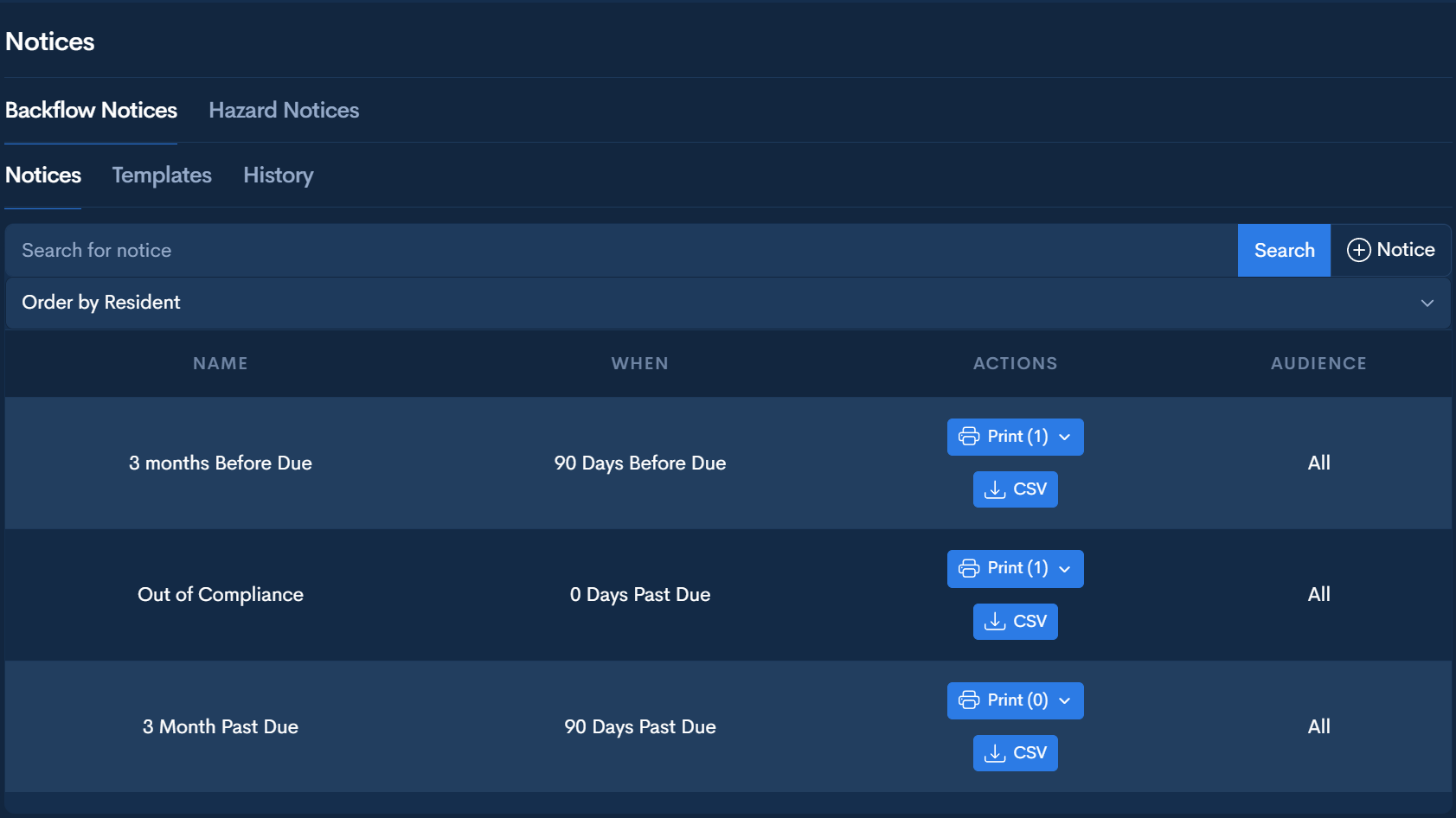
Annual Test Notices
Recurring compliance notices generated from device due dates.
Administrators set timing rules (for example, “30 days before due”). AquaResource evaluates device due dates and automatically generates notice batches when devices fall within the configured window.
-
Batch generation from due-date logic (no manual list building)
Address-level notices that can include multiple qualifying devices
Device-specific detail on every notice (make, model, serial, location, and due date)
Only qualifying devices appear—devices outside the date window are excluded
Preview-first workflow before printing
Print and mark as mailed to finalize delivery and create an audit record
Previewed and mailed statuses are timestamped and permanently logged in the Communication history
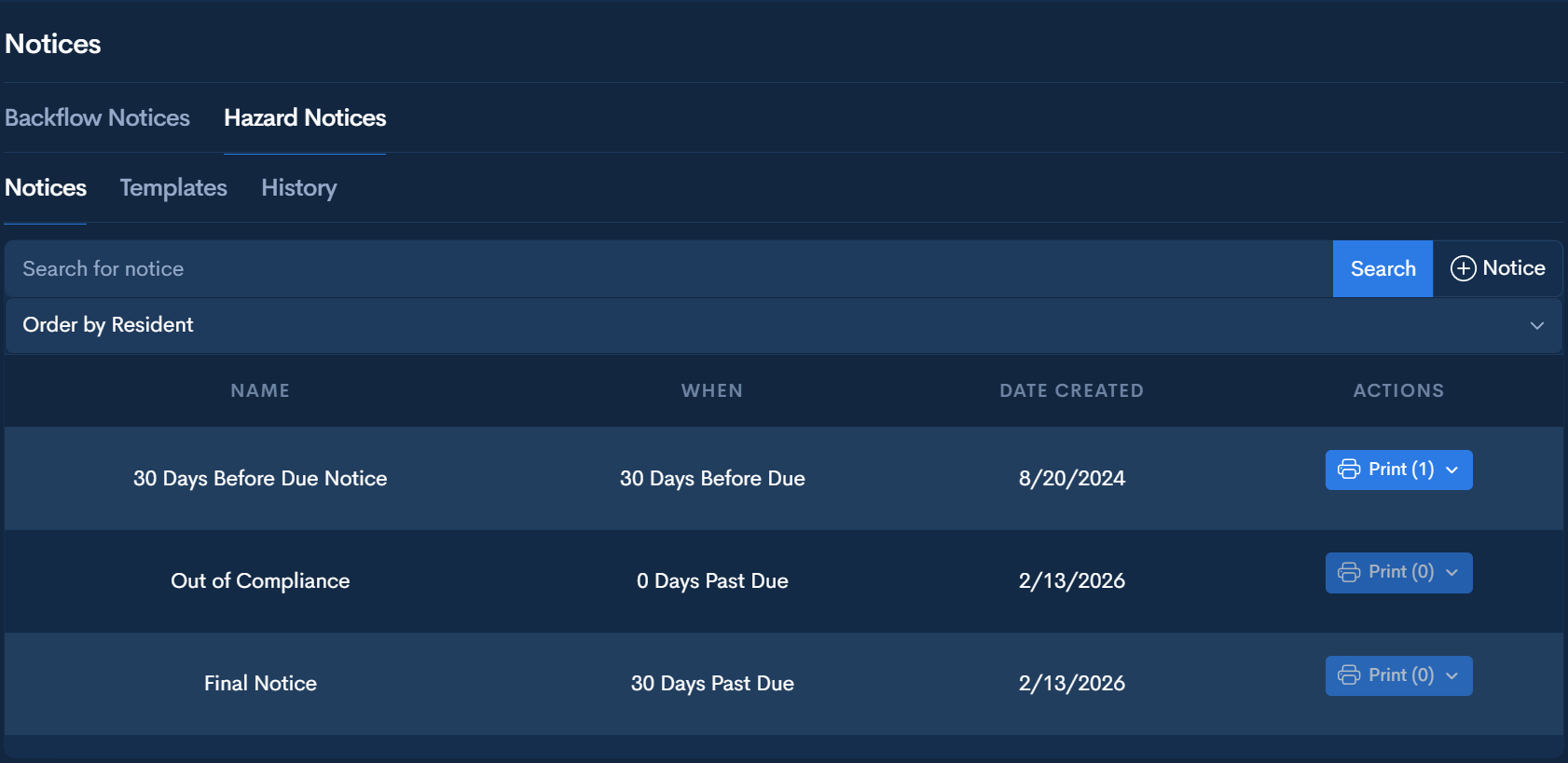
Hazard Notices
Enforcement notices generated from hazard due dates.
Hazards are created at the Customer Profile and assigned a due date. AquaResource then uses hazard due-date logic to generate hazard notice batches for review and delivery.
-
Batch generation from hazard due-date logic
Preview-first workflow before printing
Print and mark as mailed to document delivery
Status tracking is simple and defensible: Previewed or Mailed
All actions are permanently logged in the Communication history
Visuals
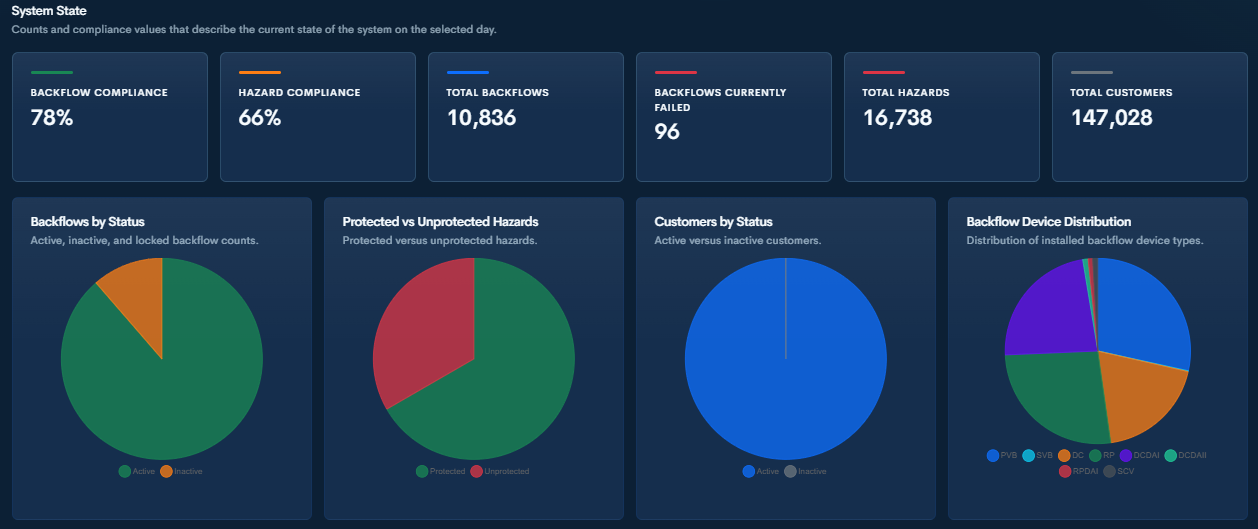
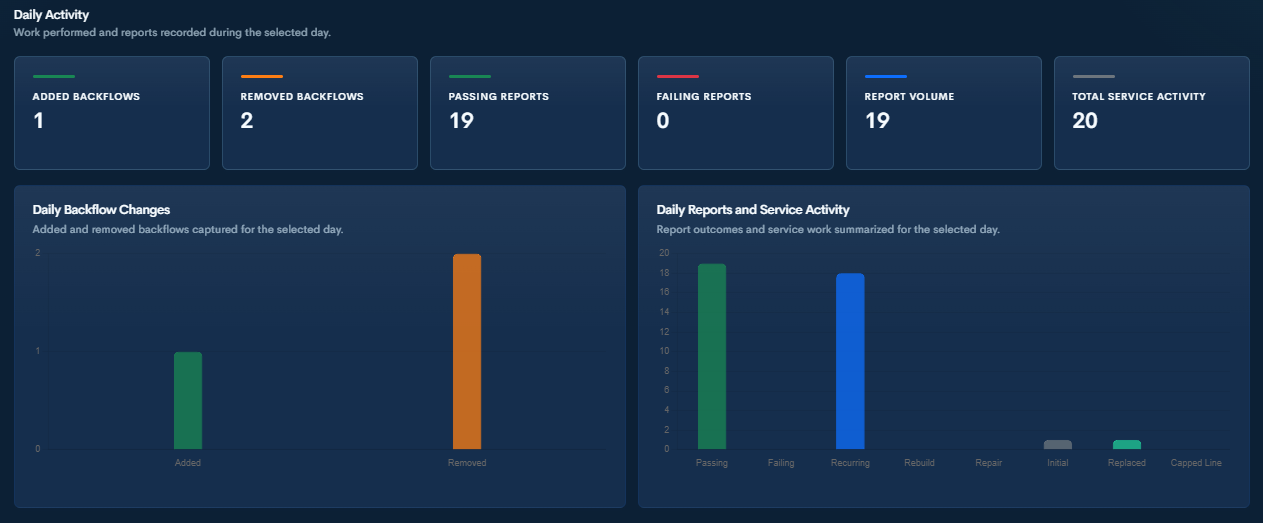
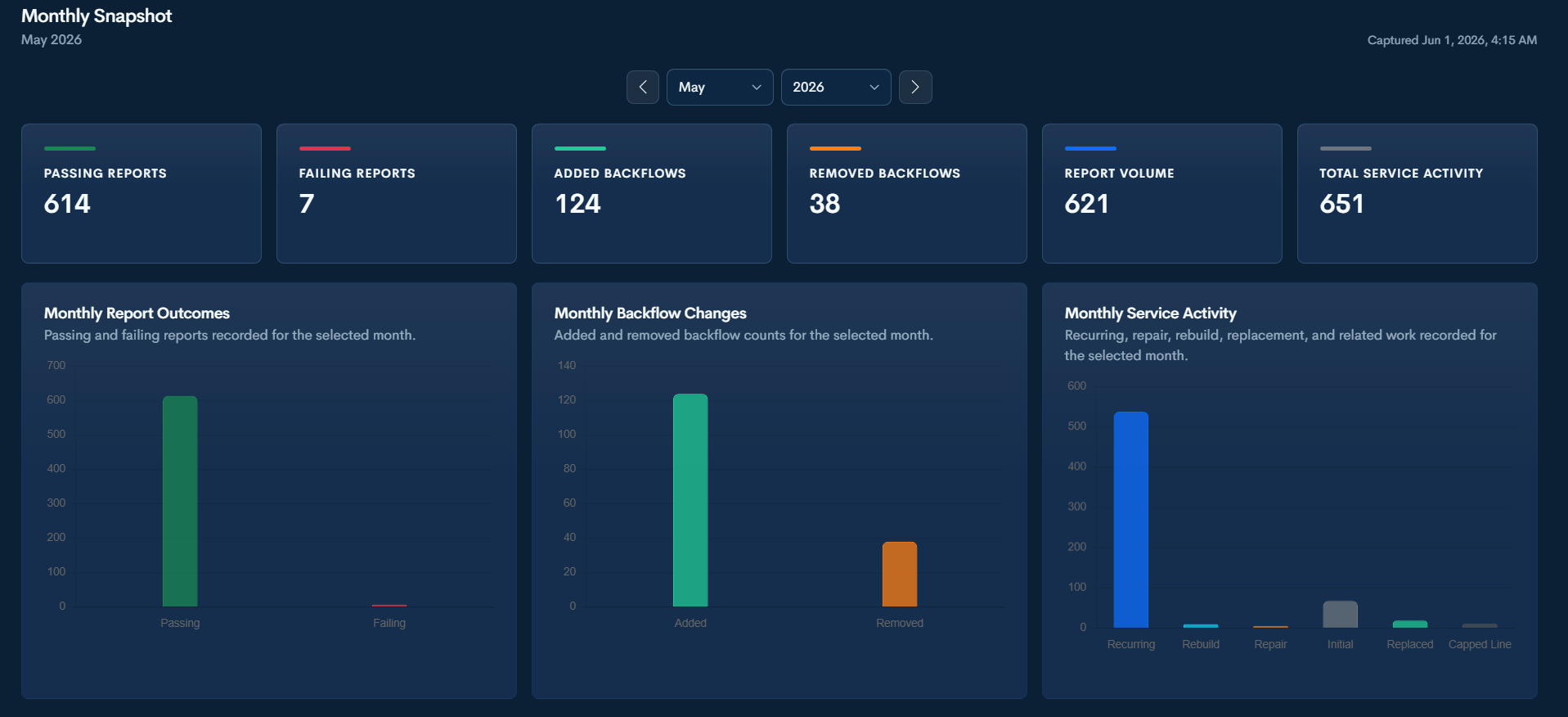
Clear snapshots of your backflow program.
AquaResource helps administrators quickly review compliance, inventory, hazards, customer counts, report outcomes, service activity, and commonly used tags through simple daily and monthly visuals.
Program Data Exports
Download structured CSV files generated from live backflow program data.
